PROPERTY SPAM PROTECTION
Shield ProThe pitch never reaches you. That is the whole feature.
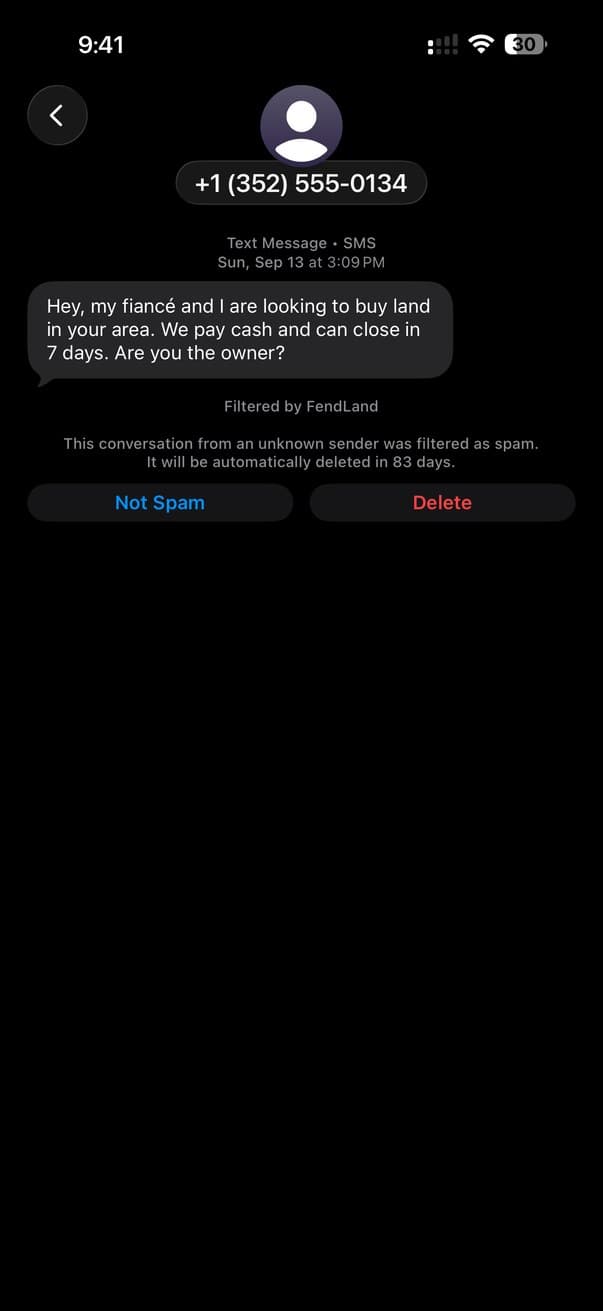
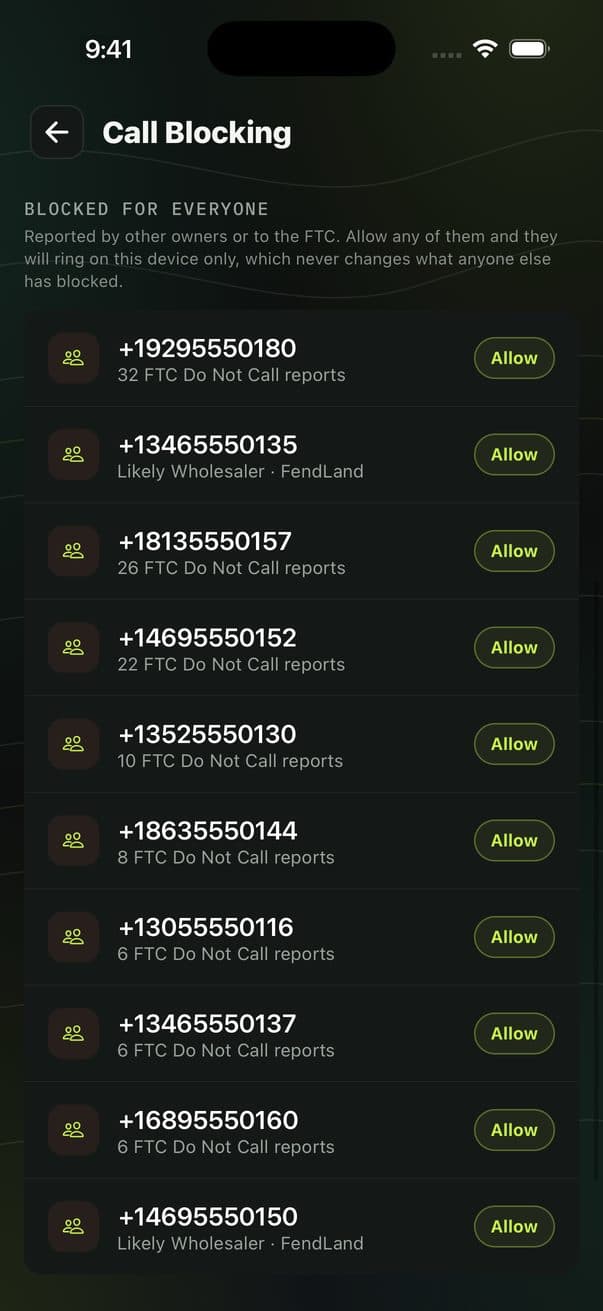
Wholesaler texts get scored on your phone before they are delivered and land in your spam folder instead of your inbox. The calls from numbers other property owners reported either never ring or arrive already labelled for what they are.
Included with Shield Pro. The message scanner and exposure check are free to try first.
WHY YOURS GETS THROUGH
Property spam does not look like spam
Carrier filters and generic blockers were built for robocalls: huge volume, obvious scripts, numbers that burn out in a day. The people texting you about your property are running a much quieter operation, and it slips past all three tests.
It is low volume
A wholesaler works a list of a few hundred owners in one county, not a million numbers nationwide. Volume-based detection never trips.
The number looks local
Bulk texting platforms hand out real local numbers, and they rotate. Your area code is not a signal, and the number has no history to judge.
It reads like a person
No prize, no threat, no link. Just a short, plausible message offering to buy your property, because a person on a laptop sent it.
So FendLand does not try to recognise a robocaller. It scores the language that wholesalers, investors and property scammers actually use, and it draws its call list from what other property owners reported, not a generic fraud database.
TWO CHANNELS, TWO MECHANISMS
Texts and calls are stopped in different places
SMS FILTER · iPHONE ONLY
Scored on your phone, before delivery
Apple built a dedicated hook for this. When a text arrives from a number that is not in your contacts, iOS privately asks FendLand whether to allow it or send it to spam. FendLand answers in milliseconds, from patterns stored on the device.
One-time setup. Settings, then Apps, Messages, Unknown & Spam. Under Text Message Filter, select FendLand. You never touch it again.
Nothing is deleted. Filtered texts go to the Unknown & Spam folder, so you can always look. Mark anything Not Spam if it belongs.
Your own keywords. Add up to 20 words or phrases. Useful for a local operator who always opens the same way.
Codes always arrive. One-time passcodes are an explicit exception and come through even if they match a keyword you blocked.
CALL BLOCKING · iPHONE + ANDROID
Blocked outright, or named before you answer
A flagged number either does not ring at all or shows up on your screen already labelled “Likely Wholesaler · FendLand”. The list is built from what other property owners reported, which is why it knows the operators working your area rather than generic robocallers.
Your calls stay on your phone. Nothing is forwarded and nothing routes through a server. The screening runs on your device against a list that syncs down to it.
Labelled, not just silenced. Seeing who is calling is often more useful than a missed call from an unknown number, especially if you are documenting repeat contact.
COMMUNITY INTELLIGENCE
The list is other property owners
Every time someone scans a message and it comes back as a wholesaler or a scam, that number is added to a shared database. It happens automatically, it is anonymous, and only the number and the verdict are stored. Nothing ties a report back to the person who made it.
That is why the call list knows the operators working your area rather than generic robocallers, and it is the part that compounds: one report is a data point, forty across five states is a pattern. Scan a number others have flagged and you see their verdict next to your own.
You can look any number up yourself in the public directory of reported numbers, or scan a message free to add to it.
WHAT YOU GET ON EACH PHONE
iPhone and Android protect you differently
Each platform gives apps a different set of tools, so the honest answer is that neither one is simply better. iPhone can filter texts and Android cannot. Android can judge a call as it rings and iPhone cannot.
| iPhone | Android | |
|---|---|---|
| Spam text filtering | Yes, on-device | Not possible on the platform |
| Blocks known spam callers | Yes, via a synced list | Yes, screened live |
| Labels the caller | Yes, on the call screen | Yes |
| Catches a brand-new number | Not on the first call | Yes, checked as it rings |
| Reads carrier spoof signals | No | Yes, via STIR/SHAKEN |
On iPhone the text filter is your first line for a number nobody has seen before, and the call list catches the repeat dialers. On Android there is no text filter, but a new number can be stopped on its very first call. Android asks you to set FendLand as your default caller ID and spam app once, which is a single system prompt.
WHAT WE CAN AND CANNOT SEE
Your texts never reach us
The filter runs inside Apple's Message Filter sandbox, which has no network access at all. Not restricted access, none. Your message is scored against patterns already on the phone and the extension returns one of two answers: allow, or junk.
That means there is nothing for us to store, nothing to read, and nothing to hand over, because the message content never leaves your device in the first place. It also means the filter cannot tell you why something was filtered, since the API has no way to return a reason.
iOS also never shows the filter messages from people in your contacts, or from anyone you have replied to before. It only ever sees unknown senders.
Call screening works the same way: nothing is forwarded, no call is routed through a server, and the matching happens on your device against a list that syncs to it.
WHERE THIS SITS
Blocking is the last step, not the first
Filtering keeps the noise off your screen, but the reason it started is that your details are sitting on lists anyone can buy. Blocking treats the symptom. The other two layers go after the cause.
QUESTIONS
What people ask before turning it on
Does the filter read all of my text messages?+
No. iOS only ever hands the filter messages from senders who are not in your contacts and who you have never replied to. Anyone you know is never shown to it. And the messages it does see are scored inside Apple's filter sandbox, which has no network access, so nothing leaves your phone.
Where do filtered messages go? Can I still read them?+
They go to the Unknown & Spam folder in Messages, not to the trash. You can open that folder any time to read what was filtered, and mark anything as Not Spam. Nothing is deleted.
Will it filter my two-factor codes?+
One-time passcodes are treated as an explicit exception and are always allowed through, even if they would otherwise match one of your own blocked keywords. Losing a login code to a spam filter is worse than letting one pitch through.
Is the SMS filter available on Android?+
No. Android has no equivalent of Apple's message filter API, so on-device text filtering is iPhone only. Call blocking works on both, and on Android it is actually stronger because Android can screen a call in real time.
Why does a spam call still get through on my iPhone sometimes?+
On iPhone, FendLand blocks and labels through Apple's Call Directory, which is a list your phone syncs in advance. It cannot make a decision while the phone is ringing, so a number nobody has reported yet can get through on its first call. Android screens each call as it arrives, so it catches new numbers too.
How is this different from the spam blocker my carrier already gives me?+
Carrier and generic blockers are built around robocalls and mass fraud. The numbers that text property owners are usually low-volume, use real-looking local numbers, and read like a person wrote them, so they do not look like robocalls. FendLand scores the language wholesalers and investors actually use, and its call list is built from what other property owners reported.
Can I add my own words to filter?+
Yes, up to 20 of your own words or phrases in the app. Anything containing one goes to the spam folder. It is useful for a local wholesaler who always opens the same way, or a phrase specific to your area.
Protect me from property spam
Set the filter once in Settings and stop thinking about it. Included with Shield Pro, along with data removal and number monitoring.
Get FendLand